macOS Sonoma Beta 3, released yesterday, includes fixes for several bugs I reported to Apple. That allowed me to remove some ugly workarounds and generally make Default Folder X function better. But true to the spirit of beta releases, there’s also a new bug in Sonoma B3 that impacts DFX, so there’s a workaround for that included in 6.0a8 😁
Long story short, if you’re running Sonoma Beta 3, make sure to use Default Folder X 6.0a8. But DON’T use it if you’re still running Sonoma Beta 2, as I’ve removed the ugly code that gets around the bugs in B2.
The latest preview release of Default Folder X 6 offers preliminary support for macOS 14 Sonoma, which Apple made available as a developer preview at WWDC.
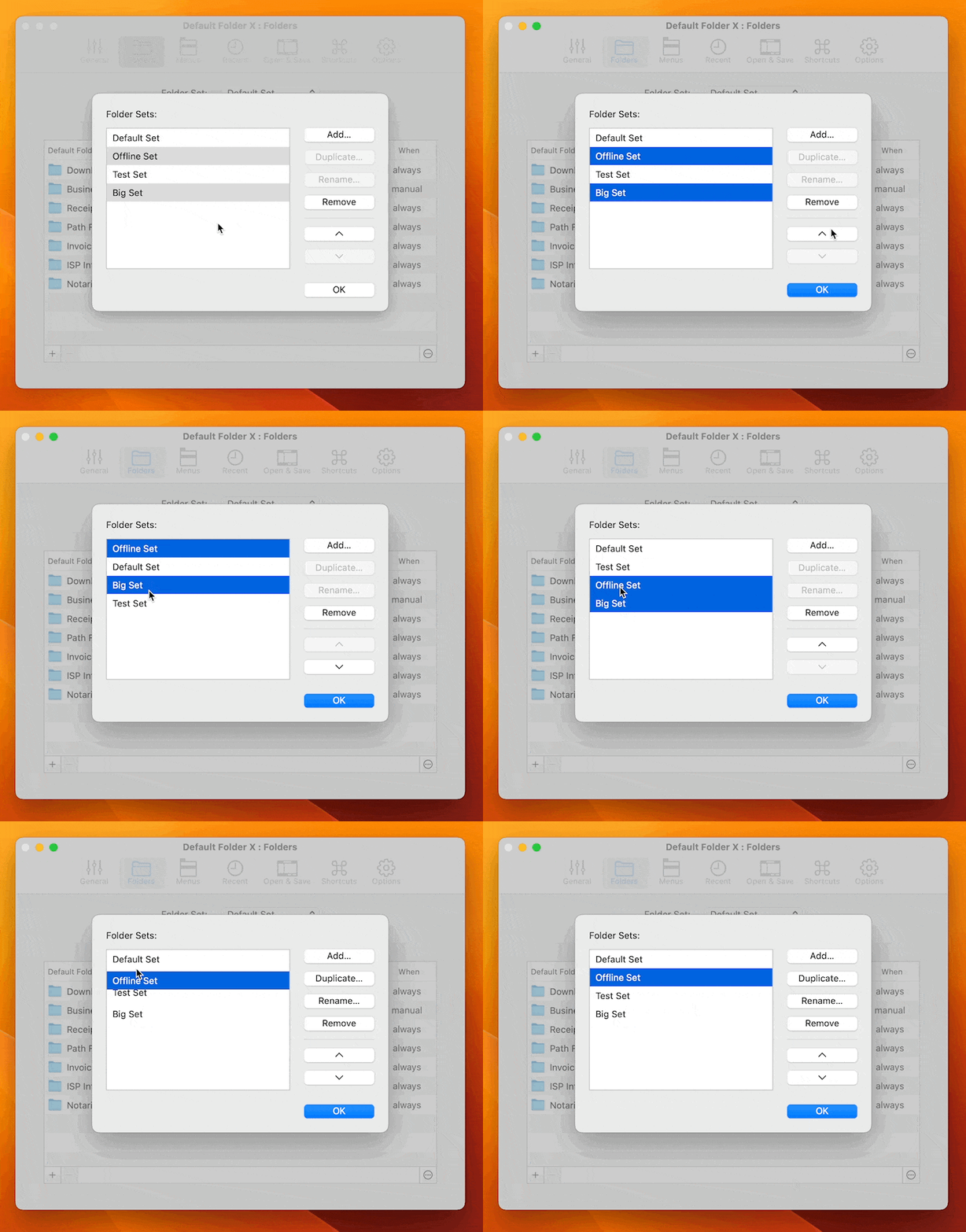
Default Folder X 6.0a6 also gives you better management of folder sets. Folder sets are a frequently-missed feature that some users find invaluable when switching between multiple workflows, clients, or projects. Since it’s frequently-missed, these changes won’t excite all Default Folder X users, but I know some of you have been asking for this repeatedly. You can now keep folder sets in whatever order you want, not just sorted alphabetically, and managing them is easy with multi-select and drag-and-drop:
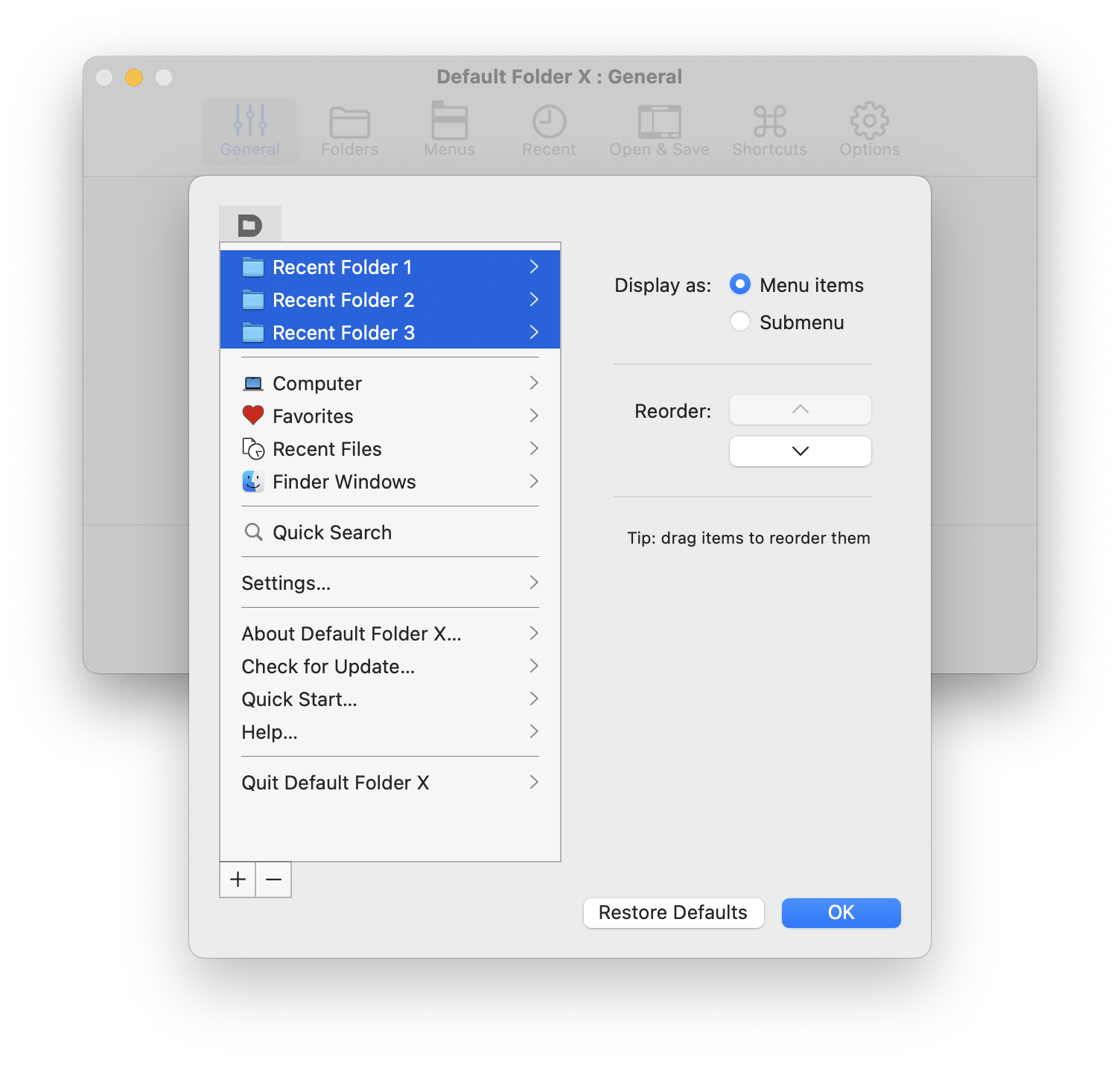
Version 6.0a6 also adds multi-select to Default Folder X’s menu customization dialog, making it quicker to reorganize DFX’s menu in your menu bar, as well as addressing several bugs.
As usual, if you’re already running an earlier preview build of Default Folder X 6, just select “Check for Update” from its menu. If you’re new to Default Folder X 6, you can get more info and grab a copy from the Default Folder X Testing page.
Default Folder X 6.0a4 is available for download. This is another “preview” release, intended for testing and to get your feedback. Like earlier pre-release builds, this one adds a bunch of new features. It’s very stable, so you should be able to just install it and run it as part of your regular workflow. For a quick overview of all of the new features in version 6, see the Default Folder X 6.0 Tour page.
Debuting in 6.0a4 is the ability to customize the menu that Default Folder X puts in your menu bar. You can add, remove and reorder items, as well as putting the contents of any of the submenus (Favorites, Recent Folders, Finder Windows, etc) directly in the top-level menu for quicker access. Click on the “Customize” button in the General tab of the settings to get the editor.
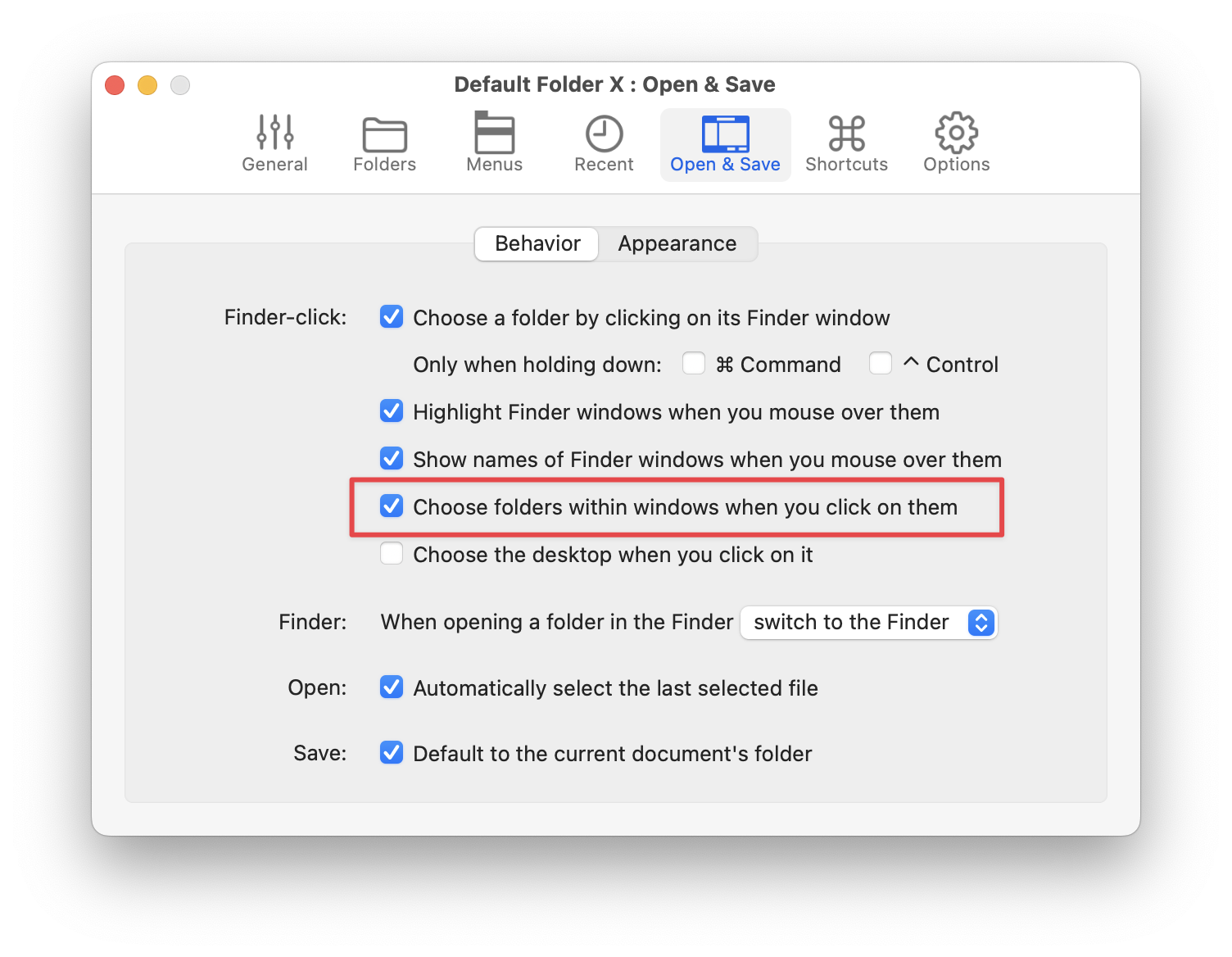
There’s also an experimental option for Finder-click which recognizes items within Finder windows. Turn on this checkbox:
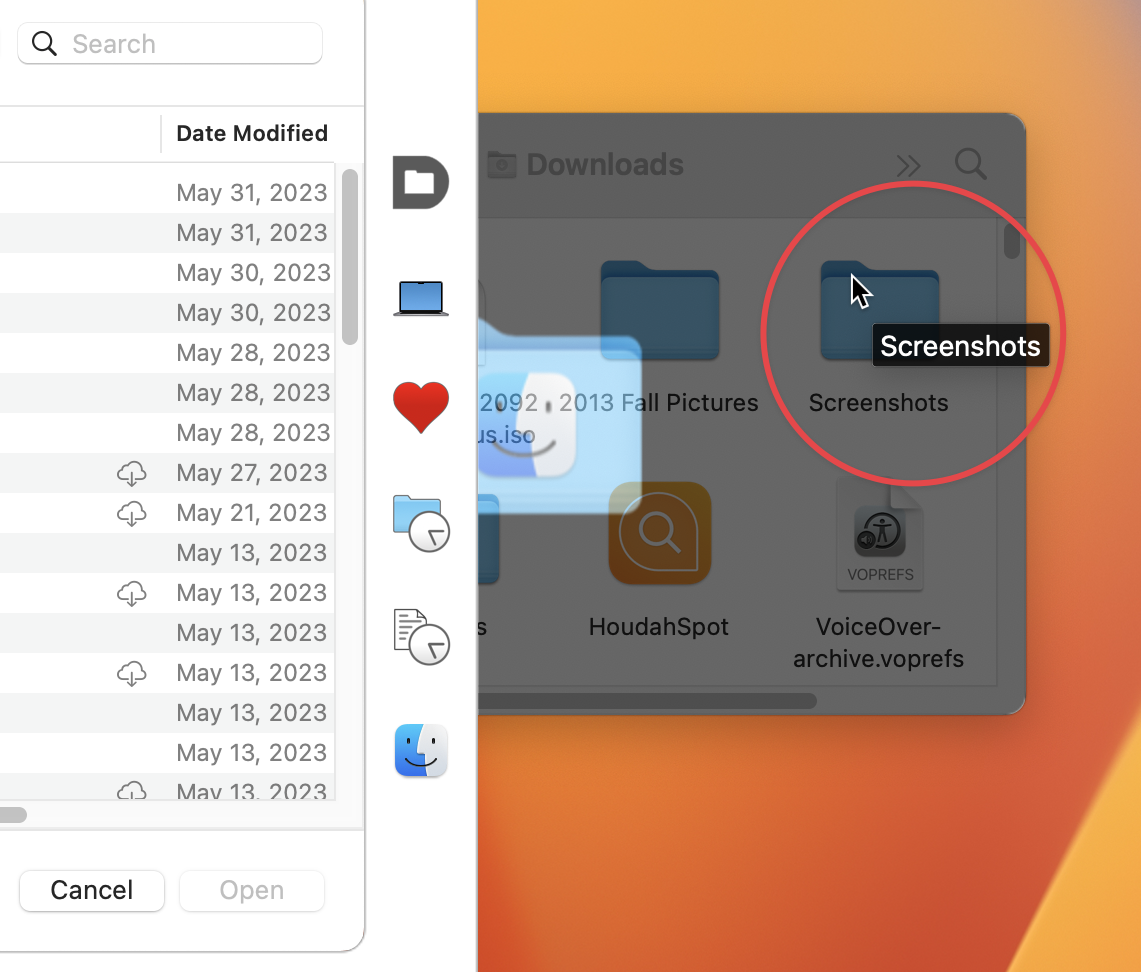
and Finder-click will change the location in file dialogs to the folder you click on, rather than just changing to the folder represented by the Finder window as a whole. In the example below, Finder-click will take you to the “Screenshots” folder that’s currently under the cursor, rather than the Downloads folder.
Of course, this also works when the Finder is in List View or Column View mode.
The reason this feature is still experimental is that I’m concerned that some people will find it confusing, and that even folks who like it may find it unintuitive when the Finder window is hidden behind the window of another app. As you move the mouse around, the folder name displayed by Default Folder X changes as it passes over different folders in the window (which you can’t see). Please try it and let me know your thoughts, positive or negative.
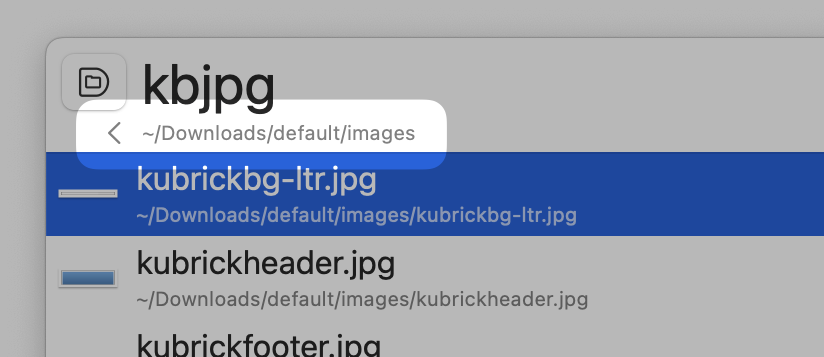
The new Quick Search window shows additional context when you hit the right arrow to search within a folder. The folder’s path is shown below the search field, and there’s a “back” arrow to take you back to your previous search results.
Also, searching for “..” will give you the parent of the folder you’re searching in. We’re getting pretty good at navigating through the filesystem with the keyboard 😉
There are a number of other additions and numerous bug fixes that are all detailed on the Default Folder X Testing page. There are also download links there, or if you’re already running an earlier 6.0 preview, just choose “Check for Update” from its menu in your menu bar to get the latest build.
Default Folder X 5.7.8 is available, largely thanks to a single individual. Default Folder X user Andrea Bornstein discovered that browsing Time Machine backups caused Default Folder X’s Finder-click feature* to stop working.
I’ve been getting sporadic reports of Finder-click failing for quite a while, but was never able to isolate the cause of it. I tried numerous fixes based on the information I could collect from people that reported the issue (and discovered a few weird edge cases along the way), but the reports kept coming. I didn’t know how to reproduce the problem on a Mac here, so I never had a way to test locally. And people that reported it said it would come and go, so I couldn’t rely on them to test potential fixes either. Very frustrating. 😡
Then Andrea’s careful observation gave me a reliable way to make it happen, and I could finally test and debug a true fix. Hurray for smart, detail-oriented customers! 😎
And what an odd bug it was (and still is) – not in Default Folder X, but in the Finder. Default Folder X uses the macOS Accessibility API to gather information from the Finder – it’s essentially a way to programmatically say “hey Finder, give me a list of your windows”. Normally the Finder happily complies, but if an app asks that question after you’ve been browsing Time Machine backups, the Finder just says “nothing to see here!” Luckily, there’s another way to coax that info out of the Finder, so I’ve sidestepped the bug entirely while waiting for a fix from Apple (the bug is filed as FB12199998).
So – all you folks who restore files and folders from Time Machine on a regular basis, you can reliably use Finder-click without resorting to hidden settings in Default Folder X. I’m sorry it took so long to get to the root of the problem, but honestly, it’s a pretty weird one.
And in other news, version 5.7.8 of Default Folder X also adds badged icons to the Finder-click interface. If you’re running ForkLift or Path Finder alongside the Finder, you’ll see an icon indicating which of those apps “owns” the window you’re currently hovering the mouse over. Like the ForkLift 4 icon on the folder in the screenshot above.
Choose “Check for Update” from Default Folder X’s menu in your menu bar to get the update, or download it from the Default Folder X “What’s New” page. Oh, and the update’s free, as usual.
* For those that don’t know, Default Folder X’s Finder-click feature is available in the Open and Save dialogs of any app. While in the file dialog, you can click on any open Finder window behind it, and the file dialog will switch to show the contents of that folder. This works with ForkLift and Path Finder as well as the Finder.
Version 6.0a3 brings a host of refinements to the new Quick Search feature, including support for non-roman languages and non-English-speaking locales. Searching is also more responsive, user interaction is much smoother – it just works better all around. Please give Quick Search a try and let me know what you think!
I’ve also addressed issues with the synchronization of Default Folder X’s settings between multiple Macs over iCloud. There’s still testing to be done here – mostly in terms of detecting and diagnosing iCloud configuration problems. I’d welcome more people who have an identical (or similar) file and folder structure on two different Macs and want to have your recent and favorite items up-to-date and available on both machines.
6.0a3 also brings bug fixes and support for the beta version of ForkLift 4, and support for older versions of macOS (I’ve tested as far back as Mojave so far, but it should work fine on High Sierra too). A full list of changes is on the Default Folder X Testing page, and you can download it directly here.
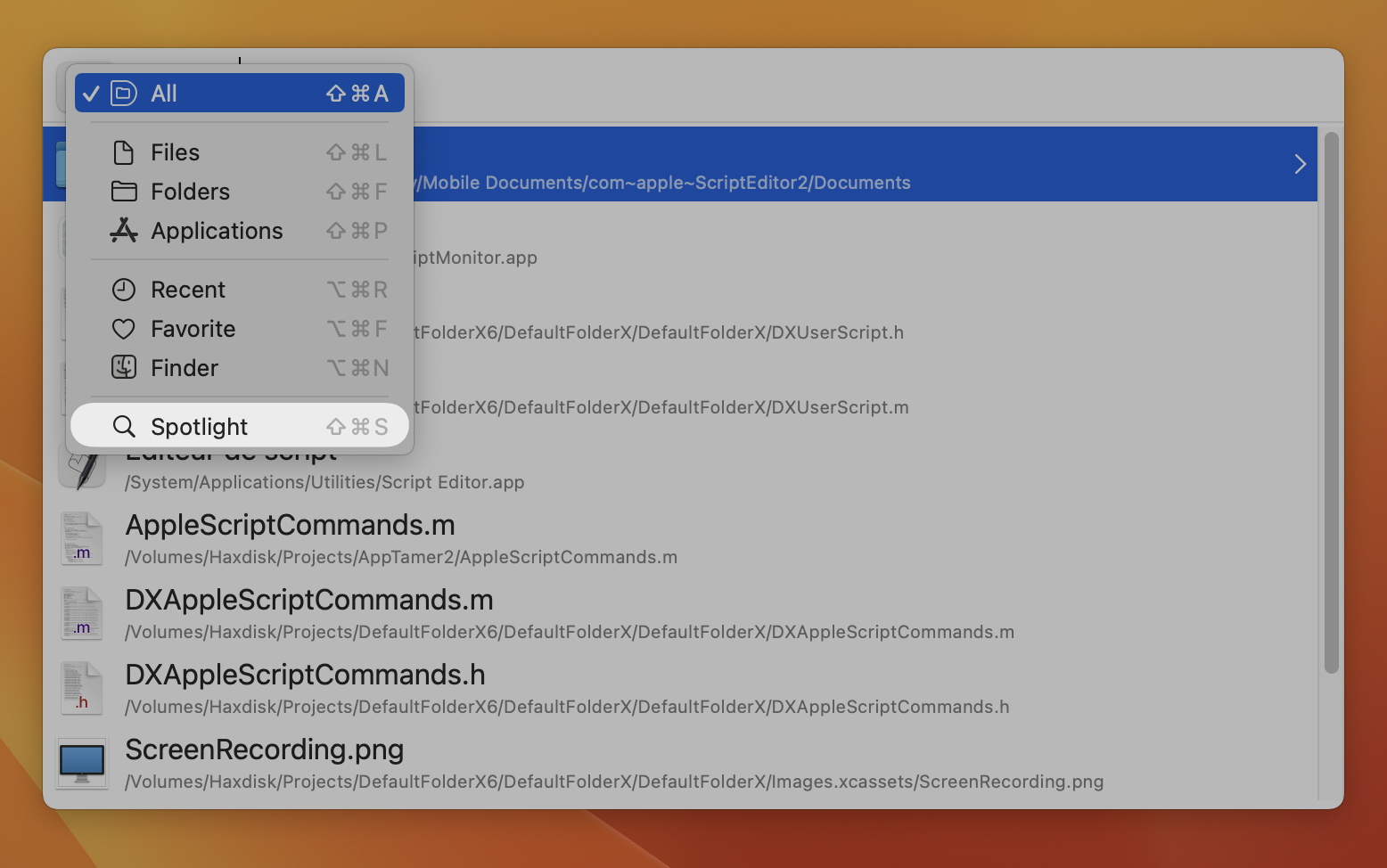
A new pre-release build of Default Folder X 6 is available for testing, adding Spotlight search as an option in its Quick Search window.
Quick Search will find files and folders super-fast in your recent and favorite items, but there are some occasions when you’re opening a file you don’t often access. In those cases, press Command+Shift+S and Quick Search will use Spotlight to find things instead. It’s not as fast, and matching file and folder names isn’t as smart, but you’ll be able to open what you want even if Default Folder X hasn’t seen it recently.
This release also smooths the flow of moving around and searching subfolders in Quick Search, refines the icons used in Default Folder X’s toolbar and Quick Search menu, enables Command+Shift+G correctly in Save As dialogs, and addresses other bugs in the previous alpha release.
Details and download links are on the Default Folder X Testing page. If you’re already running an earlier pre-release build of Default Folder X 6, you can just choose “Check for Update” from its menu to download the new build.
Version 6 of Default Folder X is gaining steam! I just posted the first alpha release, meaning it’s close to being feature-complete. There’s now a dedicated page explaining the new features, so I won’t rehash them again here. I do have to say I find the Quick Search feature and expanded filename fields to be essential now that I’ve been using them 😁
Version 5.7.6 of Default Folder X is available for download, offering a number of fixes and improvements.
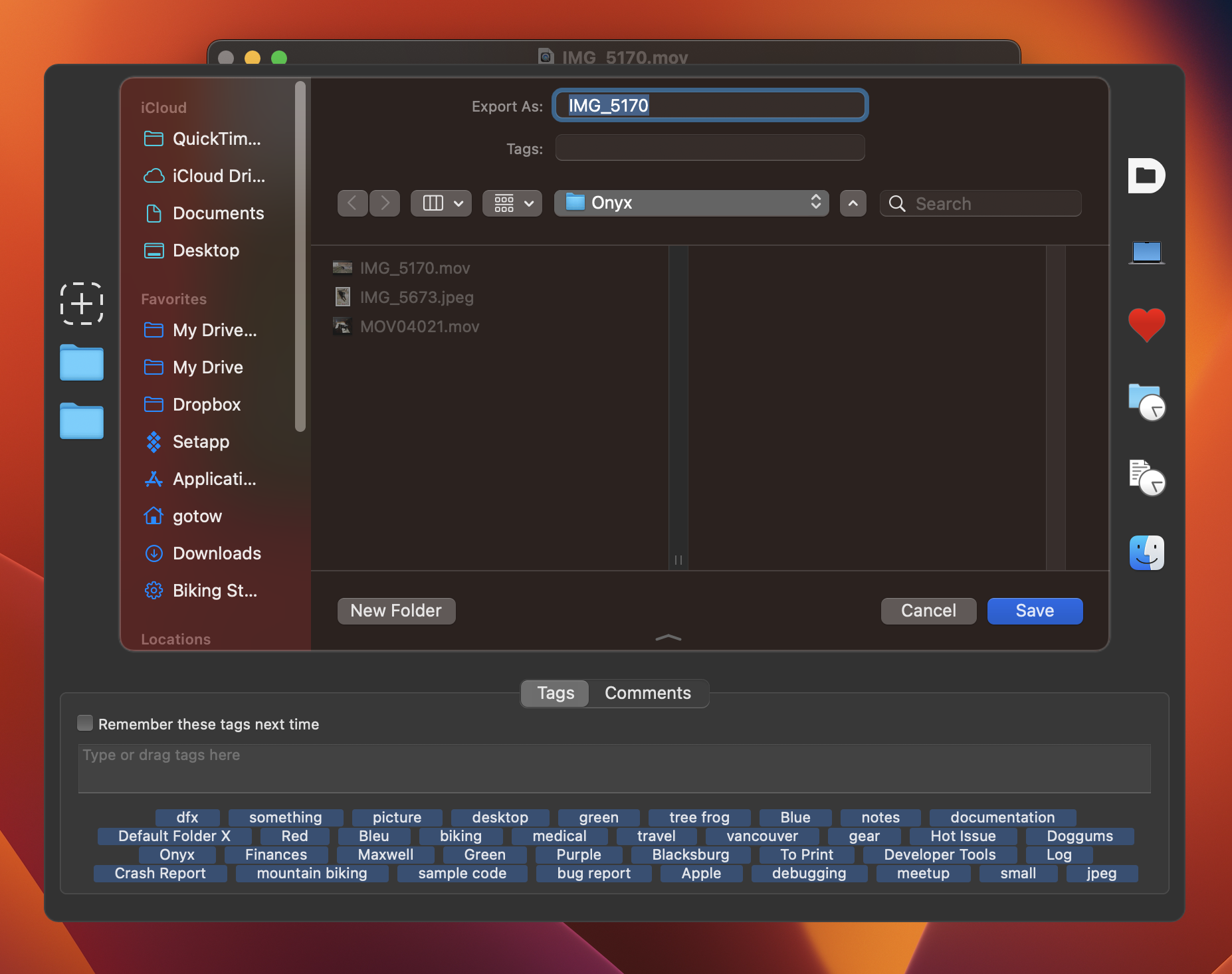
A new addition is its ability to match the light or dark theme used in the current file dialog. If you’re running a photography, video or design app that offers a custom ‘dark mode’ even when the rest of your system is running in light mode, Default Folder X’s toolbar will no longer pop out at you in glaring white – it now matches the look of the dialog it surrounds. Yeah, it’s about time 🙄, but it took a – um – “creative” approach to finally get it implemented.
Other improvements included fixes for a number of little annoyances. Finder-click was broken in a few rare scenarios and that’s been fixed, folder switching is improved (yet again), and compatibility issues with SPSS, Raycast, SpeedDock, GraphicConverter and Luminar Neo have all been corrected. And the error that could occur when creating two new nested folders in a file dialog in quick succession has finally been eliminated.
A full list of changes is available on the Default Folder X release page, along with download links for English, Japanese, French, German and Danish versions. Or if you’re already running Default Folder X, just select “Check for Update” from its menu in your menu bar to get the latest and greatest.
I’m pretty excited about this preview release of Default Folder X 6 – it includes two new features that have really boosted productivity for me personally.
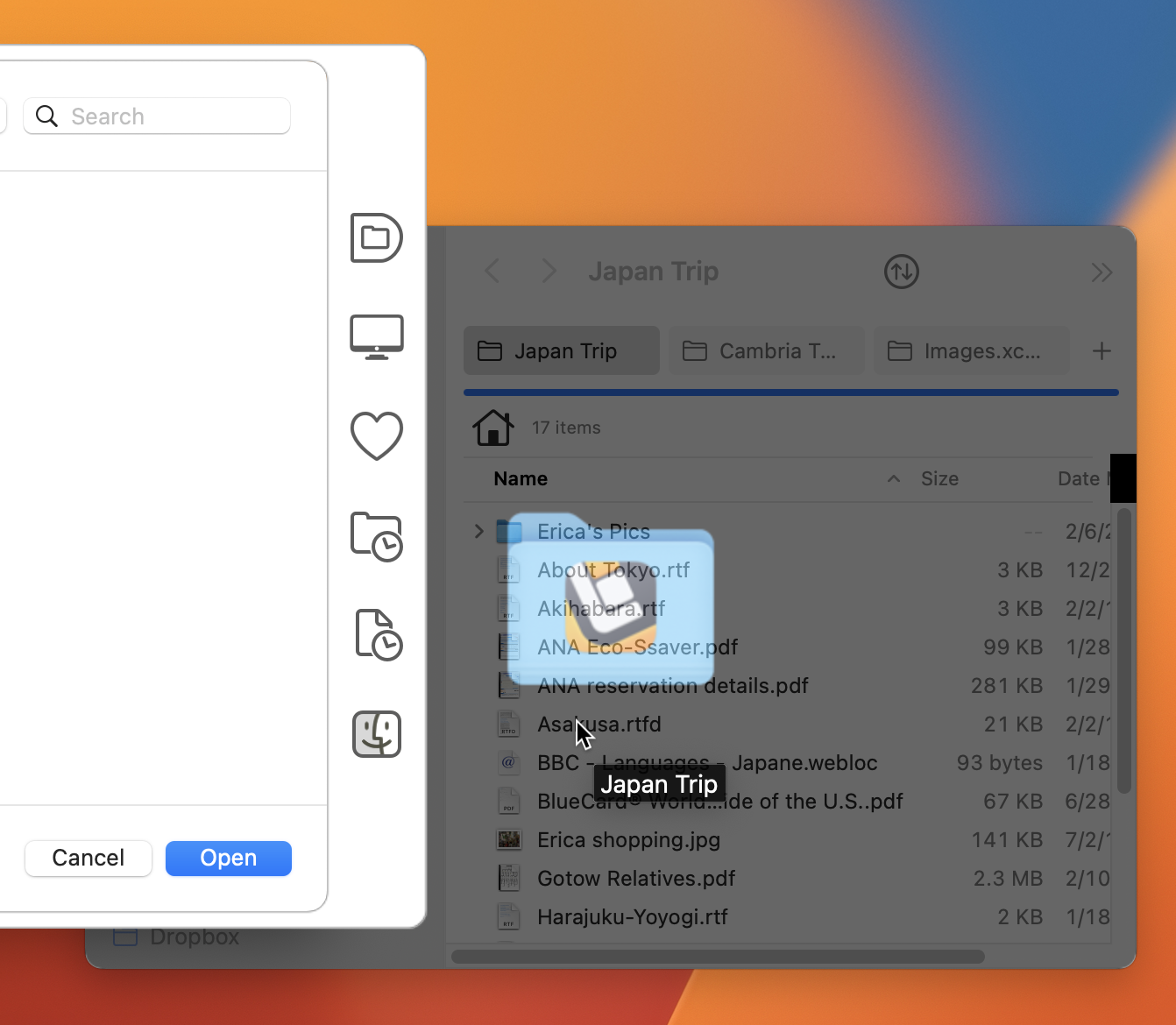
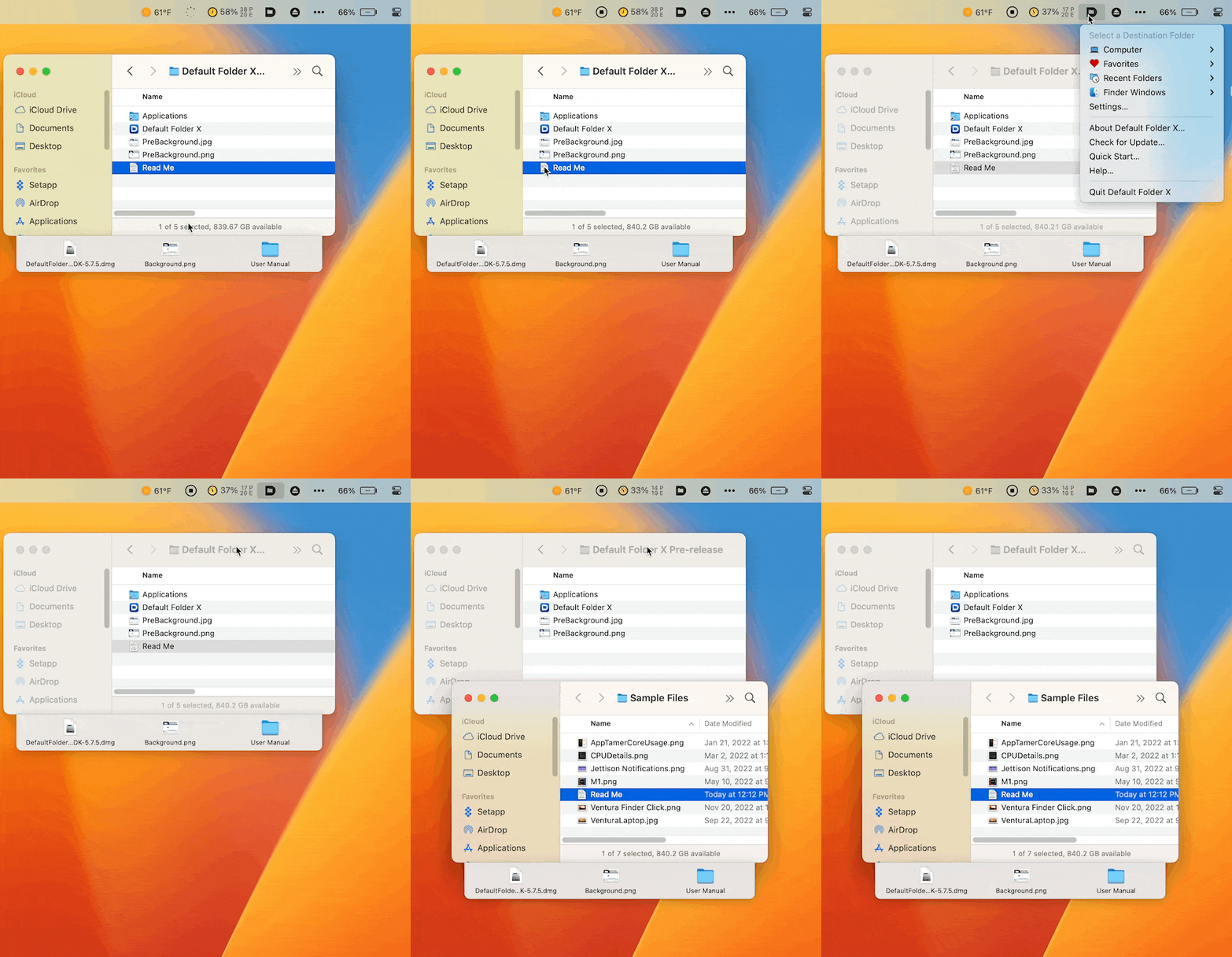
First, you can now drag and drop files and folders onto Default Folder X’s icon in your menu bar to copy or move them anywhere. Default Folder X pops up its main menu so you can show it where the dropped items should go. Select a folder from your Favorites, Recent Folders, or anywhere in the filesystem by navigating with DFX’s hierarchical menus. Once you choose a folder, the item is moved or copied, and the destination folder is opened to show you the item’s new location.
Dragging a Read Me file to Default Folder X’s icon, then using its menu to move it to the Sample Files folder.
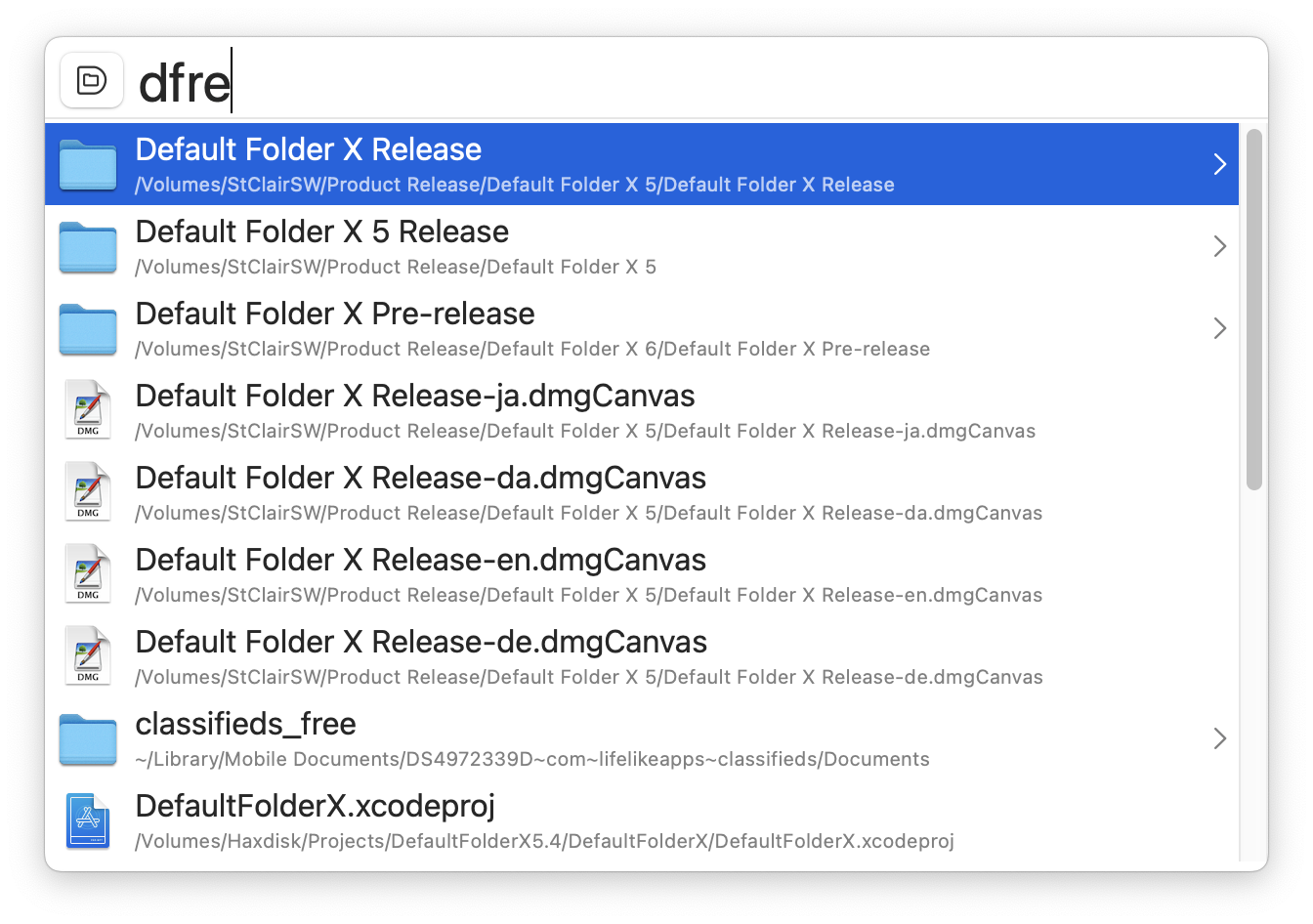
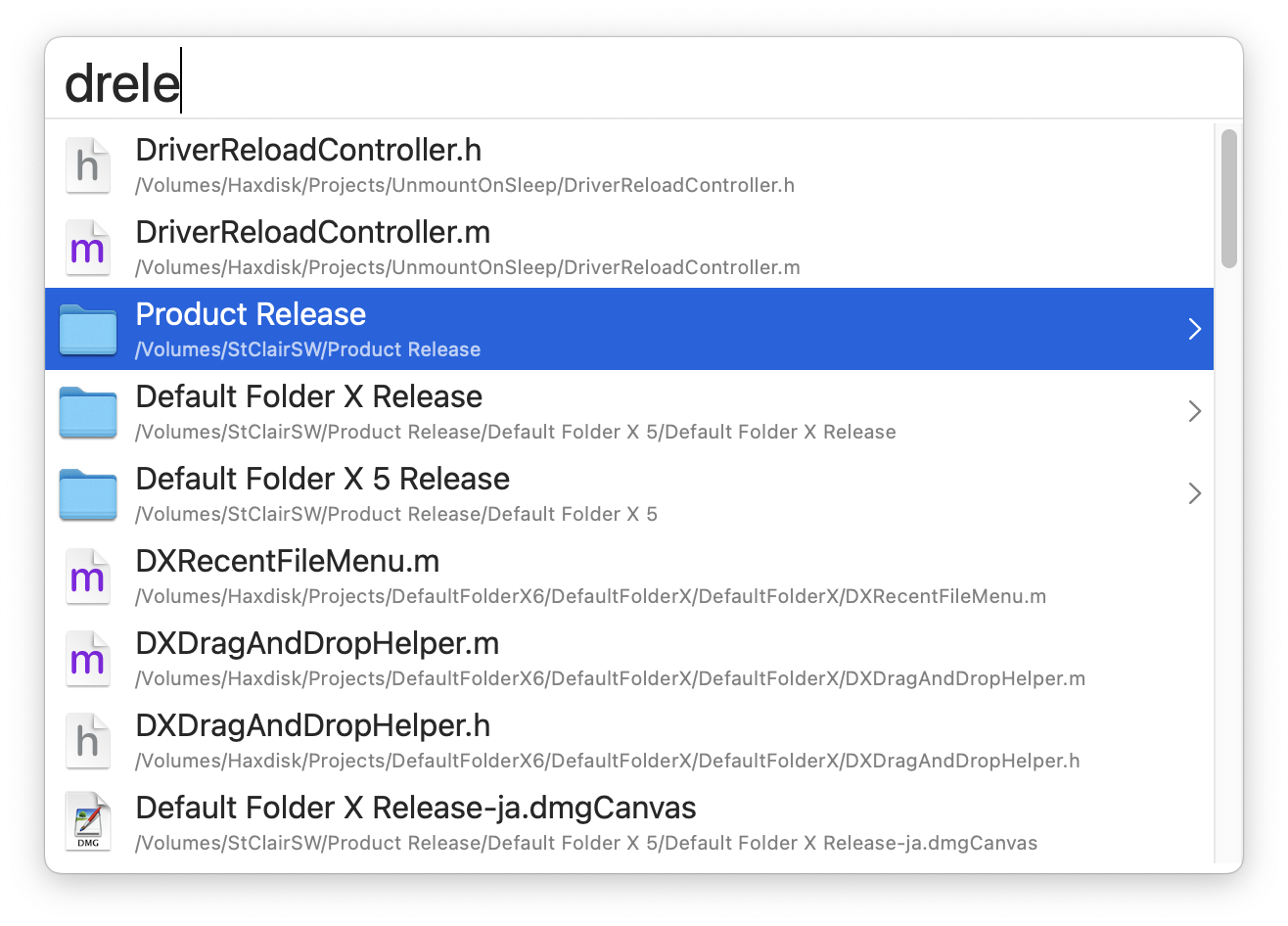
Second, Default Folder X’s new keyboard-driven mode has gotten smarter. To review a bit, there’s a “quick search” window that pops up with a keyboard shortcut. You type in a few letters, and it shows you all your recently-used folders, files and apps that match what you typed. For me, this gets me to 90% of the items I want with a couple of keypresses.
Now, however, the list of results shows a “>” button next to folders. Clicking on that or hitting the Right Arrow key on the keyboard “drills down” into that folder to show its contents, and then typing a few more letters matches items within the folder.
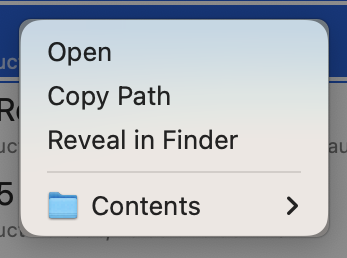
As before, hitting the Return key opens whatever is selected, but now you can also Control-click a result to get a contextual menu so you can Open, Reveal or Copy the item’s path. If it’s a folder, the contextual menu also includes a Contents submenu that lets you more rapidly descend into subfolders using Default Folder X’s hierarchical menus.
Honestly, the best way to understand it is just to try it for yourself. Download the latest build and launch it. The accompanying Read Me file contains more details on setting up and using the new features, though they pretty much just work. Hit Command+Option+Spacebar to invoke the quick search window – that’s all you really need to know.
I released a quick bug-fix of Default Folder X a week ago (sorry for not posting then, but I’ve been sick). Version 5.7.5 fixed two bugs:
The Finder-click feature wouldn’t recognize open Finder windows in some Mac configurations. This was due to a change I made in a previous update where I refactored an underlying library and made the criteria tighter for “matching” an open window to its underlying Finder window. The change made no difference in my test cases, but there are apparently a few Desktop configurations in which the matching didn’t work. So now we’re back to the way it was.
Folder switching in Open and Save dialogs would sometimes fail on macOS 13.2 Ventura (and would stay stuck in that failure mode until you quit and relaunched Default Folder X). This was due to the fact that a bug in Ventura always returns an error for one API call, making it impossible for DFX to tell whether that call has succeeded or not. I worked around this the best I could, but Default Folder X would sometimes think the call had succeeded when it hadn’t, causing it to get stuck in an error state. This is now fixed in v5.7.5. And happily, Apple has actually fixed the underlying bug in Ventura for macOS 13.3, so the whole mess won’t be an issue in another month.
If you’re already running Default Folder X, just choose Check for Update from its menu in your menu bar to get the new version. If not, you can grab it from the Default Folder X release page.